Customer support, in the same system as the work.
Same boards, same reports, same team. No second tool, no copying tickets back and forth. Forward your support address, and customer emails become work items beside the delivery work they depend on, and requesters never take up a paid seat, no matter how many write in.
A ticket is a work item.
That one idea does the heavy lifting. A support request lands in the same system your team plans and ships in, so it can be assigned, prioritized, scheduled, and reported on like anything else you build.
Email in, tickets out
Create a channel address, forward your real support inbox to it, and each email becomes a ticket filed where you choose. Replies from the customer thread onto the same ticket automatically.
Reply without leaving the ticket
Send a reply to the customer and it goes out as email, threaded so their answer comes back to the same conversation. Internal notes stay with your team, and that line is enforced across the system.
Requesters and companies
Customers are tracked as requesters, grouped into companies by email domain, with per-company routing defaults. Requesters never take up a paid seat.
SLAs on your business hours
Promise a first response and a resolution time, and let timers count only the hours your team is open. A ticket that arrives Friday evening does not blow through its target over the weekend.
A branded customer portal
Give each customer a portal at its own web address, wearing their logo and colors, with passwordless sign-in by magic link or one-time code. No passwords for anyone to reset.
Request forms
Collect structured requests through a form when you want specific details up front. Submissions are email-verified and land in the same inbox as email tickets.
Support email becomes delivery work
A customer emails your support address and a ticket appears in the Service Desk Inbox, with their message as the customer-facing description and your team's notes kept safely apart. Because the ticket is an ordinary work item, it can sit next to the engineering work it depends on and roll up into the same boards and reports.
- Triage from an Inbox scoped to tickets only, with saved views like Unassigned ready on day one
- New email tickets arrive with a suggested priority your team can confirm or change
- Filter and report on support by requester, company, channel, and SLA status, anywhere items live
SLAs that respect your working hours
Define your business hours once, then write SLA policies that match tickets by priority, work type, or customer importance. Timers pause outside open hours and resume when your team is back, and an at-risk view shows what is closest to breaching.
- Schedules with timezones, per-day windows, and holidays, or a round-the-clock policy when you want one
- SLA At Risk and SLA Breached events fire for your automations to act on, so the response is your choice, not a surprise
- Time-based automations close solved tickets, escalate unanswered ones, and nudge quiet customers
A portal your customers sign in to, not another password
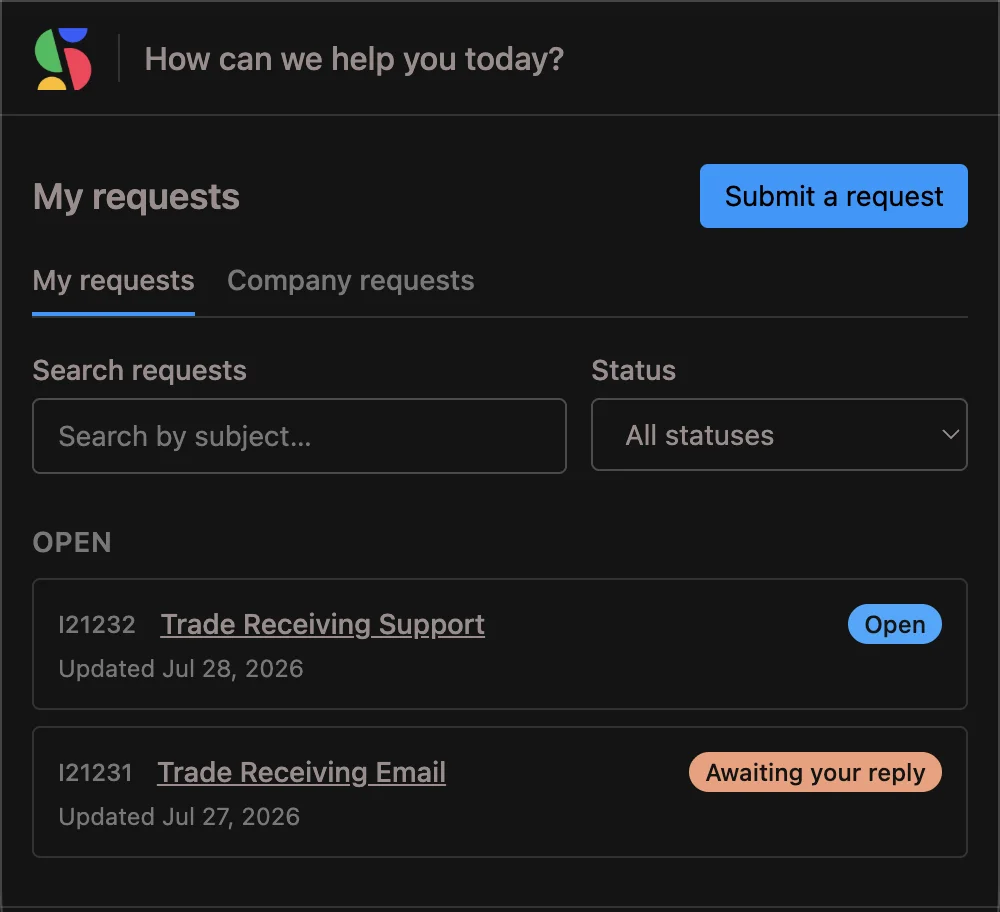
Each company gets a customer support portal at its own web address, branded with their logo, header, and color. Sign-in is passwordless: customers enter their email and get a one-time link and code. This release delivers the branded portal and sign-in, with in-portal request tracking arriving next.
- Three access modes per company: open, domain-restricted, or invite only
- Links and codes expire quickly, and access ends the moment you revoke it
- A portal identity reaches that company's portal and nothing else, never your team's workspace
Part of one connected system, so a customer request can flow straight into the same strategy, planning, and reporting as the rest of your work.
Map Value
Connect strategy to the work, so requests land inside the outcomes they serve.
Plan Delivery
Schedule tickets into boards and cycles alongside the rest of the roadmap.
Track Progress
Watch support and delivery move together, in the same views.
Measure Performance
Run the reports you already use, filtered to support work when you want it.
Knowledge Base
Give customers a Help center, and suggest answers while they're still describing the problem.
New in Service Desk.
Each of these links into the docs. The full record is in the release notes.
Customer support portal
A branded, passwordless portal per company, where customers track requests, reply with attachments, submit new ones, and read your Help center.
Forwarded email, credited to the customer
Forward a customer's email to your support address and the ticket opens in their name, with their subject, their acknowledgement, and their reply thread.
Convert any item into a ticket
Attach a customer to work you already have. It keeps its number, board, history, and links, and gains the inbox, the portal, and the customer/internal split.
Dropped mail
Support email that never became a ticket shows in one tab, and anything held by mistake becomes a ticket with one click.
Request forms with scanned attachments
Public forms accept files, scanned before anyone opens them, and staff can file a ticket on a customer's behalf.
Tickets through the MCP
Your assistant can triage the inbox, link tickets to delivery work, and draft replies with the same tools your team uses.