Separate the what from the how.
Map Value holds the what, the value you're delivering, apart from the who and when. Define it once, and planning, tracking, and reporting all read from the same map.
Separate the value from the execution.
When you map value, you don't care yet who does the work or when they'll do it. You're defining the what. DevStride holds the same work in two hierarchies at once: workstreams capture the value to deliver, while folders and boards in Plan Delivery capture the who and when. Mistaking one for the other is where misaligned boards and poor reporting come from.
- Define the value to deliver before assigning a single person or date
- Navigate and roll up the same work by value or by delivery
- Report at any level of any workstream, up, down, and across the organization
Organize work the way your business thinks.
No rigid client-project-task shape. A workstream represents a delivery of value, and you decide what that means: initiatives, products, functional areas, or any top-level division of work.
Workstreams built around value
Each workstream captures the what: a delivery of value the business cares about. Core workstreams sit at the top of the map, shaped to reflect how your organization actually delivers.
Hierarchy at any depth
Nest workstreams inside workstreams, then add items beneath them. Sub-workstreams roll up to their core workstream, so estimates, effort, and progress are visible at any level up or down the map.
A map of the whole portfolio
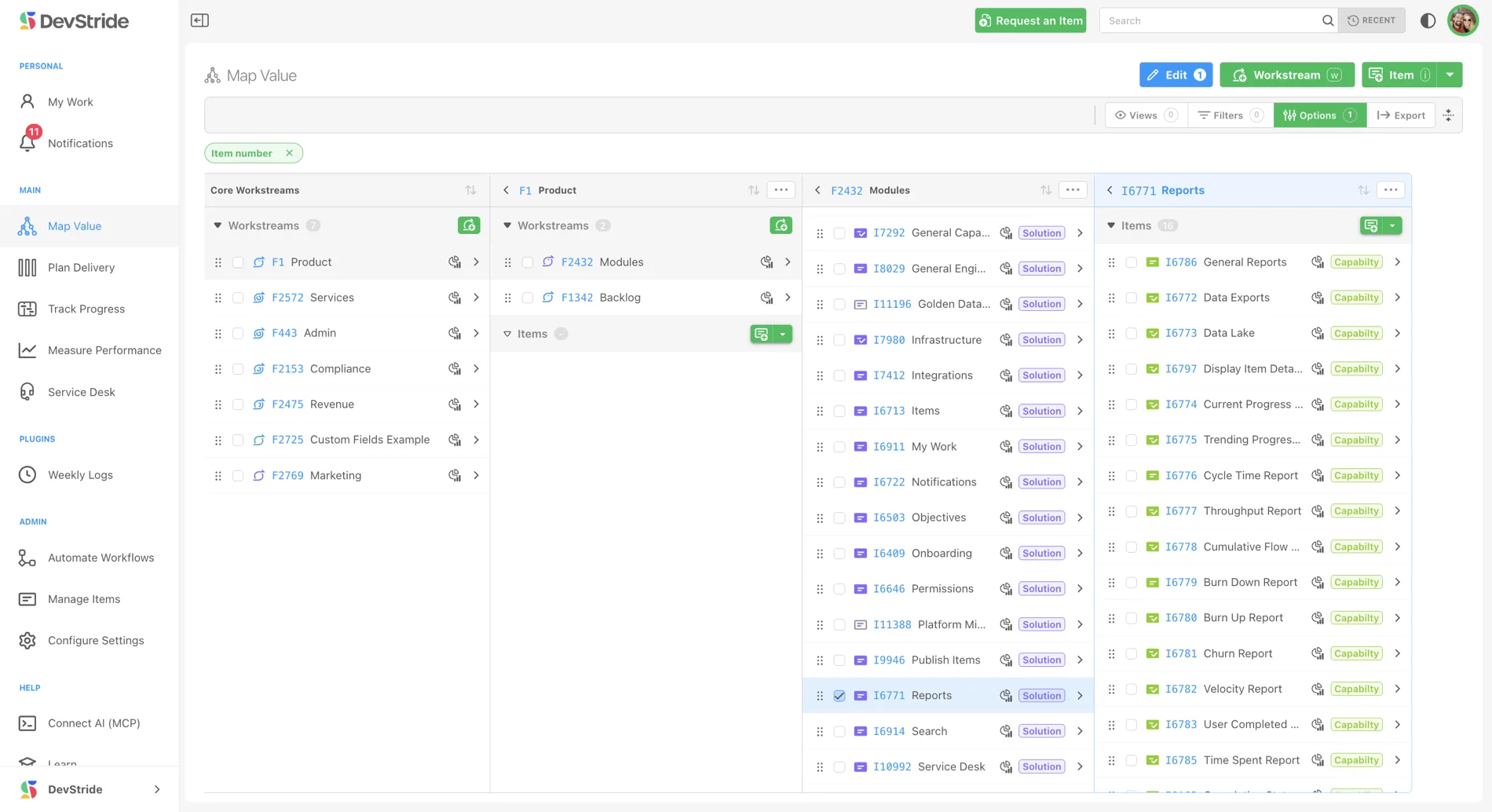
The Map is a multi-column explorer for your entire hierarchy. Drill from the top of the portfolio down to individual tasks while keeping the path you took in view.
Reorganize with drag and drop
Initiatives evolve. Drag a workstream or item to a new home and everything under it moves too, including its data and reporting. Hierarchy rules keep the structure valid.
Templates for repeatable structure
Export a workstream's structure as a spreadsheet template and recreate it anywhere, or map a large body of existing work into DevStride in a single import.
Permissions that follow the map
Control who can view, comment on, edit, or manage each workstream and item. Access is inherited down the hierarchy, and new work takes on the permissions of where it's created.
Work across the whole hierarchy from one place.
Each column of the Map shows one location, with workstreams and items in collapsible sections and count badges at a glance. Select rows and bulk-edit status, priority, assignee, location, estimates, and more in one pass. Apply a filter and the Map hides every column with no matching items, leaving only the relevant path on screen.
- Quick-add workstreams and items right where they belong
- Turn notes or documents into a batch of ready-to-edit items with Create Items with AI
- Bulk-edit a whole selection, with actions that disable themselves when they don't apply
Reorganize without losing a thing.
Workstreams change as initiatives evolve, and the map keeps up. Drag a capability from one module to another and its tasks, data, and reporting move with it. DevStride protects your item hierarchy along the way, so higher-level types can't be nested under lower-level ones by accident.
- Drag and drop to restructure the portfolio as priorities shift
- Everything nested underneath moves together, history included
- Capture a proven structure as a template and stand it up again elsewhere
Part of one connected system.
The value you map here flows straight into planning, tracking, and reporting. Every module works from the same items, so nothing gets re-entered and nothing falls out of sync.